System Settings >> Customize Protocols >> New(Edit) Protocols
By adding a protocol here, WFilter will be able to detect and block it. Certain reports will also be available.
Settings
1. Protocol Profile
Protocol profile describes the basic information of this protocol, including "Protocol Name", "Protocol Desc", "Protocol Type".
Please choose a correct protocol type which will appear in the bandwidth report.
2. Pattern Matching Rule
This defines the rules for WFilter to identify this protocol. Each protocol can have multiple patterns.
2.1 Name and Desc
Pattern name and desc for description.
2.2 Type
WFilter matches a protocol based on the first several packets of a connection.
- "TCP SEND" will match the first sent packet of all tcp connections.
- "TCP RECV" will match the first received packet of all tcp connections.
- "TCP ALL" will match the first sent and received packet of all tcp connections.
- "UDP SEND" will match the first sent packet of all udp connections.
- "UDP RECV" will match the first received packet of all udp connections .
- "UDP ALL" will match the first sent and received packet of all udp connections.
- "HTTP SEND" will match the first sent http header of all http connections.
- "HTTP RECV" will match the first received http header of all http connections.
2.3 Offset
Begin position of the packet. Please input a decimal pattern offset(example: 0 means matching from the start byte)
2.4 Begin Byte
Character of the begin byte in capitalization HEX. Leave it blank if the begin byte is not fixed. Example: 0F.
2.5 Format
Format of the pattern. Supported pattern formats: "0" - regular expression, "1" - port or ports range. If you are using a HTTP pattern, the format will be the http mime header name.
2.6 Pattern Content
- Regular expression. Example: "^\x02[\x00-\xff]*\x03$".
- Port or ports range. Example: "9090", "9090,9091", "9090-9010".
- HTTP mime header value(Regular expression). For example: the format is "User-Agent", content is "Web Messenger".
Examples
Let's take protocol "http" and "ftp" as examples:
- HTTP
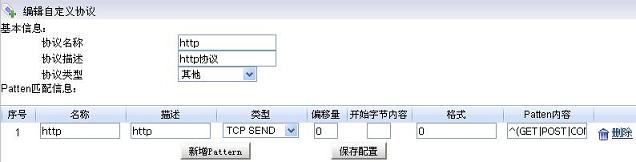
Figure 1 Leave the begin byte as blank since the begin byte is not static. And set the pattern content to "^(GET|POST|CONNECT)\S" according to HTTP protocol document.
- FTP
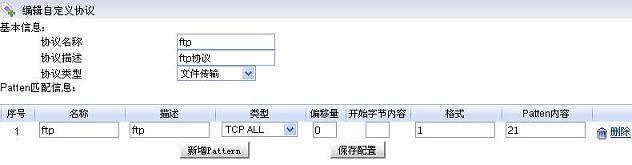
Figure 2 FTP is identified by port. So the pattern content is "21" with format "1".